1) A Gmail Account.
- If you don’t already have a Gmail account, go to www.google.com and type in “how to create a Gmail account”. Follow the instructions given to create one.
- It will be important to remember the name and password you used to create this account. WRITE IT DOWN.
- We use google accounts as it allows us a secure and safe way to limit access to our members information. You will NOT be able to access or be given database info outside this means.
2) Make contact with the National Office via phone:
Pat: (716) 327-5748
Carl: (716) 668-6242
- For security reasons we will need to verify with you personally over the phone that the account belongs to you. The office will confirm your qualified access with the current VP of Operations before access is granted.
How to use the database.
The database you are accessing is a cloud based document. This means that it can be edited and viewed in real time. You will no longer need to wait for us to send reports to you. You can come to this document at any time and see its updates. So instead of sending out a report at the end of the month to our directors, directors will instead just need to log in to get the data.

Your reports are now tabbed based. You will need to click on each tab to get the data you need.

To filter info by your state or region, select [Data], [Filter views] then the parameter you want to filter by. You will need to filter for each tab this way.
How to make corrections/updates
Only the national office can make corrections. We can not allow outside editing permissions as there is membership payment data in these forms. There is an option for you to let national know information is wrong or needs to be updated.
– STEP ONE –

To let national know something needs corrected or updated. Select the cell that needs corrected. A blue line will appear around it so you know that’s what is selected.
– STEP TWO –
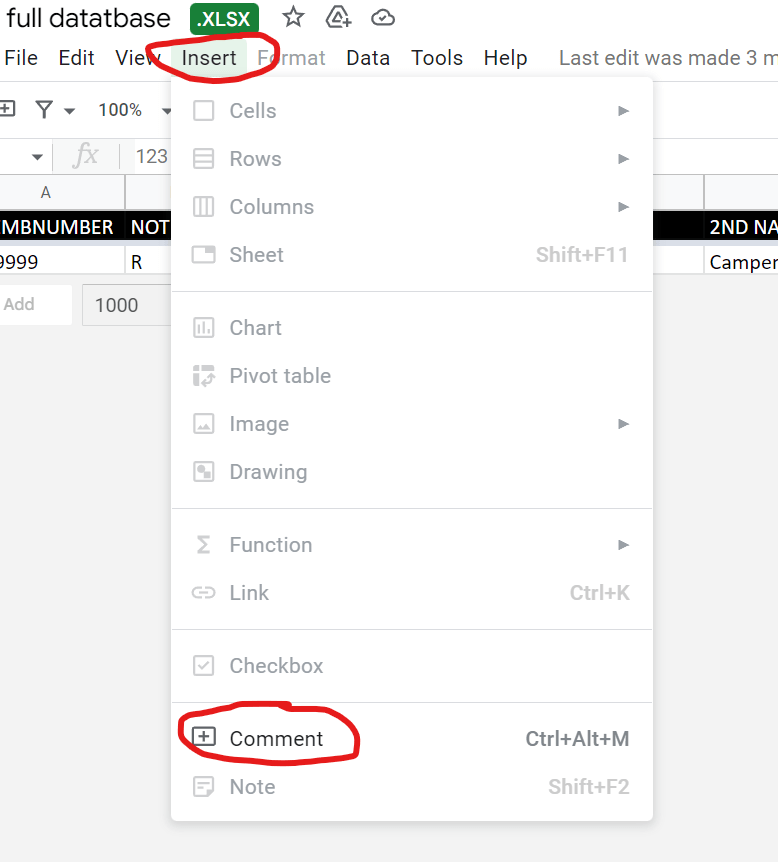
Select [Insert] then [Comment].
– STEP THREE –
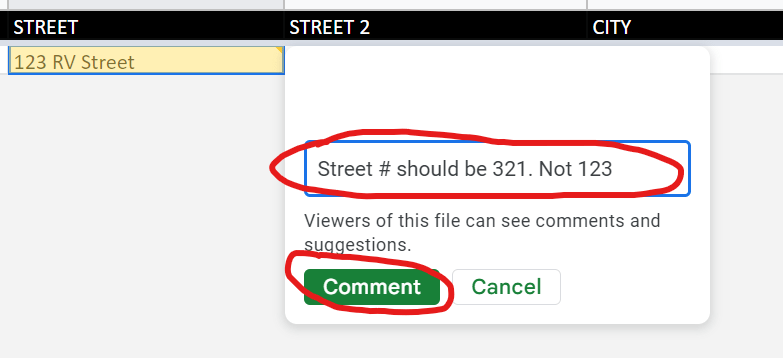
A box will pop up. Type in what is wrong and what the correct info should be. When done press the [Comment] button. Next time the National Office logs into the database we will be alerted that a comment was left for us to read. It will tell us who left it and where the correction needs made. You will NOT need to email or or call us to let us know.